Styling
Basics
We can apply custom styles to modify the page to our needs.
The simplest way to do this is by using <style> tags and use standard CSS to do the job. We can use those tags e.g. in Markdown or Jinja Markdown cells.
For example:
%load_ext pretty_jupyter
%%jinja markdown

<style>
    h2 {
        background-color: red;
        color: white;
    }
</style>

## Level 2 Header

### Level 3 Header

<style>
    h3 {
        background-color: blue;
        color: white;
    }
</style>

## Another Level 2 Header
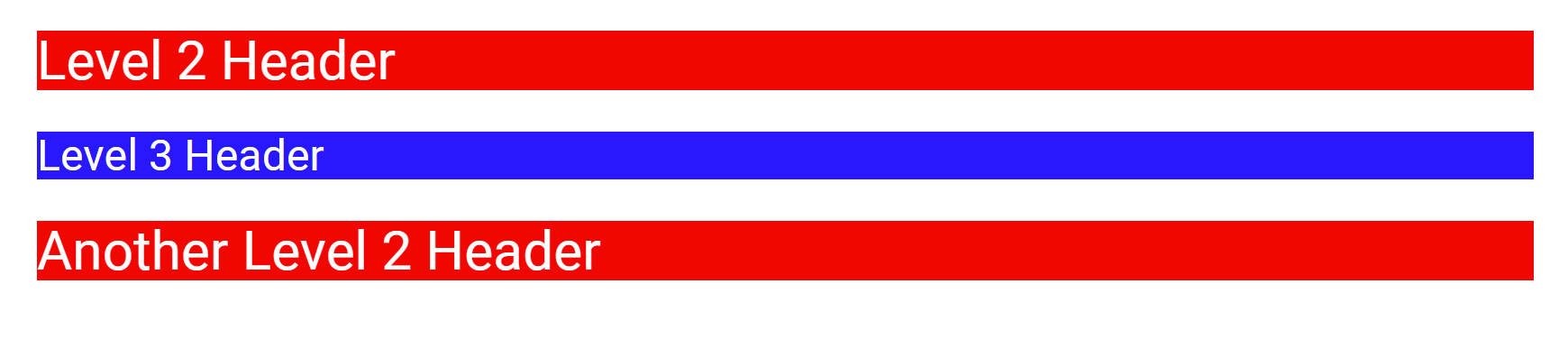
Figure: Styling example output
Targeting Elements
Pretty Jupyter allows us to add classes and IDs to elements. Usually we do this with markdown elements because basic Markdown doesn’t support adding custom classes to them.
The following block demonstrates this as an example. The line below the table adds two classes and specifies the id to the table. Therefore, the output table will have classes custom-class-1 and custom-class-2 and it will have id my-table-id.
| col1 | col2 |
|------|------|
| val1 | val2 |

[//]: # (-.- .custom-class1 .custom-class2 #my-table-id)
We call the line under the table a token specifier.
This functionality is not limited for tables. It can be applied to any markdown or html element. Even to a paragraph:
This paragraph will be a warning alert.

[//]: # (-.- .alert .alert-warning)
Note
Markdown automatically creates paragraph elements from the text separated by newlines. Therefore if styling a paragraph, we need to have an empty-line between the text and the token specifier.
Note
Placing token specifier under the header will modify the section, not the header. This behavior is used to specify tabsets or headers that are ignored by Table of Contents.
There are a lot of already existing classes from Boostrap 3 or Pretty Jupyter that can be used to make the report prettier. The most interesting ones are listed in Styling Options.
Themes
We can customize the general theme of the page. To do this, we specify theme attribute in the notebook’s metadata.
For example, to use bootstrap theme, write this in your notebooks metadata:
output:
    html:
        theme: bootstrap
This will include embed your theme directly in the output. The definite list of local supported themes is available in Themes section.
You can also use any other theme compatible with bootstrap 3 and link it as an url.
Examples
Check out more examples in our example repository. Themes are specifically demonstrated in themes example, where we apply dark theme on a simple notebook.